
Desktop software · Version 1.4.0
ElectroGridy
Single-line and multi-line diagrams for PV and low voltage

Overview
ElectroGridy draws diagrams for photovoltaic systems, transformer stations and low-voltage distribution: single-line overview diagrams (SLD) and multi-line schematics (MLD) as projects with numbered pages. True to scale in millimetres, with grid, object snap, layers and blocks with attributes. Existing diagrams can be brought in from PDFs and pictures.
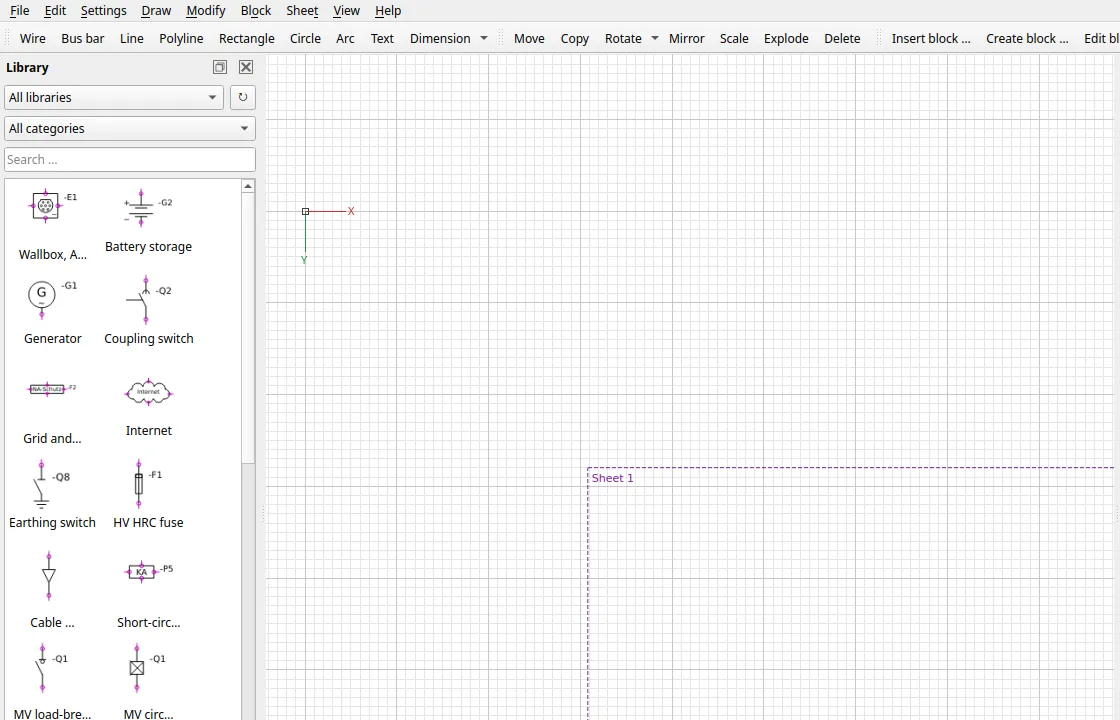
What it does
- IEC 60617 symbols. 42 symbols for PV, substation and low voltage, plus wallbox, DC storage, PV module and selective main switches. 23 multi-pole symbols for schematics.
- Wires that follow. Wires snap to connection points, bend at right angles and follow when a block moves. Branches follow their wire.
- Reference designations. After inserting, the program asks for designation, type and value and suggests the next free one: -F2 after -F1.
- Print up to A0. Drawing frames A0 to A4, PDF export with exact page size. Several frames make several pages.
- Multi-line schematics. In a schematic project ElectroGridy draws multi-line (MLD) on numbered pages with cover sheet, terminal plan, cable and parts list. Wiring connects all poles in one go, cross references read /5.3.
- Import diagrams. Bring in existing diagrams from a PDF or a picture: a PDF arrives as editable lines and texts. Photos and scans are turned into lines and texts, still experimental, even when shot at an angle, or stay as a template to trace over.
- Linux and Windows. On X11 and Wayland, as a snap with automatic updates, as a .deb or as a Windows installer.
Installation
- On Ubuntu:
sudo snap install electrogridyor search for ElectroGridy in the App Center. - Or download the .deb from the releases and install it with
sudo apt install ./electrogridy_<version>_all.deb. - On Windows, run the installer from the releases. It isn't signed, so click “More info”, then “Run anyway”.
Files of version 1.4.0
| File | Size | SHA-256 |
|---|---|---|
| ElectroGridy-1.4.0-setup.exe | 92 MB | 0f186c7e0edea4d67fb8bb0ed10e4649e4b1ebce395f398e8c41472cf66455bf |
| electrogridy_1.4.0_all.deb | 235 KB | d244edd03258802c12b258692bc33a17dffa678982a5f8d9d7614bb405401d03 |
Check on Linux with sha256sum filename, on Windows with certutil -hashfile filename SHA256. The files are served by GitHub.
How it's built
ElectroGridy is written in Python with PyQt6. One unit is one millimetre, the origin is marked with axes. Drawings are saved as .grdy files and open on double-click. Before each release the test suite runs in an Ubuntu 26.04 container against the built package; the snap is built and published by GitHub Actions.
Changelog
v1.4.029 Oct 2026
SLDGridy is now called ElectroGridy
- Program, package, snap and Windows installer are now called ElectroGridy or
electrogridy. The GitHub project moved to https://github.com/Glenn-Dandy/ElectroGridy (old links redirect). - New file suffixes:
.grdy(drawing),.grdylib(library),.grdyframe(frame template). Old.sldg,.sldgliband.sldgframefiles still open, also by double click. - On the first start ElectroGridy takes over settings, own symbols and frame templates of SLDGridy. The old ones stay untouched.
.deb: the new package replaces thesldgridypackage on installation.- Windows: the installer replaces an existing SLDGridy installation.
- Snap: the snap is now called
electrogridy(sudo snap install electrogridy). Remove the old one withsudo snap remove sldgridy, it gets no more updates. Snaps keep their data apart: copy own libraries from~/snap/sldgridy/current/.local/share/sldgridy/library/by hand if needed.
Circuit diagram frame and printing
- 20 mm top margin, so punched sheets (6 mm holes, centre 12 mm from the edge) are not punched into the frame. 5 mm left, right and bottom.
- The margins now reach to the outer edge of the frame line. Printers that cannot print the outermost 5 mm or so cut off half of the line before, it came out thinner at the left, right and bottom than at the top.
- The warning in the print dialog when the printer cuts into the frame now knows the circuit diagram frame too.
- Existing projects get the matching title block when opened.
v1.3.229 Oct 2026
New
- Logos for company and customer: Block > Import logo (PNG, JPG, SVG) stores the logo in the library "My logos". "Fill in title block" and the project data have a button with large previews next to company and customer. The logo stands at the left of the field, the name right of it.
- Company and customer in several lines, e.g. name and address (Enter for a new line). The title block fits the lines together, the cover lists them one below the other.
- Shift sides parallel: polylines and rectangles have a grip in the middle of every side that shifts the side parallel, as with wires.
- Scale by a factor: select, Scale, type the factor, Enter. It scales around the top left corner of the selection. Tab goes to X/Y for a base point of your own.
- Import library asks where the blocks go: into "My symbols" or as a new library. If a name is taken, both blocks are shown side by side: keep, replace or rename.
- Export library: a whole library, one category or single blocks. Nested blocks come along.
- Snap to texts: new snap mode "Insertion point" at the reference point of every text, also for tracking.
- Page number by hand in "Edit page" (empty means automatic).
- Page type "Blank page": no frame and no title block, for imported sheets with a frame of their own.
- Page > Format changes the format of all pages of a project at once if wanted.
- Zoom in the status bar can be clicked: 25 to 400 %, fit page, zoom extents or a value of your own. Next to it the sheet format is shown (e.g. A4 landscape).
- The import window shows the format of the PDF page.
Changed
- Circuit diagram title block laid out anew: four rows of 4 mm (16 instead of 20 mm high), the revision table on the left, then company and customer without captions and wider, the circuit diagram number with the project title below, at the right plant, location, page type and sheet. Format and page description are no longer in the title block (the status bar shows the format). Existing projects get the new title block when opened.
- Frame: the band with the column and row names is 3.5 instead of 5 mm wide, the names 2 mm high. The outer line stays, the drawing area grows.
- New circuit diagram projects and new pages are A4 landscape (before: A3). Existing files stay as they are.
- In German mode Qt's own buttons and the print and preview dialogs are German too (the .deb recommends qt6-translations-l10n, the snap ships it).
Fixed
- Import: a marked part of the page came in larger than the whole page. The scale now stays the same.
- Library: deleting the last block removes the empty library from the list.
v1.3.125 Oct 2026
New
- Dark mode for the whole program: DARK button in the status bar or Settings > Dark mode. Menus, toolbars, library, dialogs and drawing area turn dark, printing, PDF and export stay on white paper. Settings > Drawing area sets the drawing area light or dark on its own.
- Cables (Draw > Cable, in circuit diagram projects): draw a line across the conductors of one cable, then enter the cable (-W1 is proposed), type and cores. The cores are proposed from the connections (PE and PEN: GNYE, N: BU, outer conductors BN, BK, GY). Terminal plan and cable list fill in by themselves.
- Cable outlet (Draw > Cable outlet): a freely placed label saying where a cable goes, e.g. “Outgoing to the LV board”. It appears in the cable list under “To”.
- Page scale: Page > Edit page > Scale, e.g. 1:5 for the enclosure layout. Symbols are inserted at that scale, typed lengths and dimensions are real millimetres, content already drawn is rescaled when the scale changes.
- Set terminal: tick PE, N or PEN instead of a number. The PE terminal is a plain circle like the others.
- New symbols in the MLD library: fuse switch disconnector 3-pole, 4-pole with N passing through and 4-pole with N fused.
- About SLDGridy: link to wozise.de with the wozise logo.
Changed
- Terminal plan: “Terminal strip: -X1” on one line, 24 instead of 21 terminals per page, the table ends after the last terminal.
- Pre-releases come as .deb only. The Windows installer is built for releases only.
Fixed
- DXF import: device drawings with helper blocks such as the dimension arrow “_Closed” come in as the whole drawing instead of just the arrow.
- No more hang when moving the mouse over detailed symbols such as imported device drawings. Such symbols are kept ready, mouse moves over them are about five times faster.
- Block editor: saving or discarding returns to the page it was opened from. In a circuit diagram project it used to land on an empty canvas.
v1.3.025 Oct 2026
Linux and Windows CAD for single-line diagrams, circuit diagram projects and scaled drawings (PV systems, roof layouts, transformer stations, LV distribution).
Install (Ubuntu 24.04 and 26.04):
sudo snap install sldgridyor: sudo apt install ./sldgridy_1.3.0_all.deb
Windows 10/11: SLDGridy-1.3.0-setup.exe. Not signed: click "More info", then "Run anyway".
New in 1.3.0
- A start window offers three kinds of file: overview diagram (single-line, as before), circuit diagram project (multi-line, numbered A3 pages) and drawing (scaled, e.g. a roof layout); each shows only its own tools, menus and libraries
- Circuit diagram projects: page types (cover, contents, circuit diagram, terminal plan, cable list, parts list, ...), plant and location numbering, column strip, frame and title block; prints exactly on A3 or fitted onto A4
- Devices by tag with contact mirror and cross references, interruption points that continue a conductor on another page (click the conductor end), wiring aids, an all-pole symbol library
- Pages that fill themselves: cover, contents, parts list, cable list and the terminal plan as a form (one strip per page, cable columns, bridges); lists can be exported as CSV
- Import circuit diagrams (File menu): a PDF from a CAD program comes in as editable lines, circles and texts; photos, scans and screenshots as a picture or converted into lines and texts (experimental, texts read with Tesseract; for a sheet photographed at a slant drag the corners onto it)
- Scale objects by a factor or a reference length
- Windows installer
- Printing sends standard paper sizes to the printer (no more shrunken printouts)
- The .deb needs python3-pyqt6.qtpdf, python3-pdfminer, tesseract-ocr and tesseract-ocr-deu; apt installs them automatically
- Files with project pages or pictures cannot be opened by 1.2
Everything from 1.2.0 is included.
v1.2.015 Oct 2026
Linux CAD for single-line diagrams and scaled drawings (PV systems, roof layouts, transformer stations, LV distribution).
Install (Ubuntu 24.04 and 26.04):
sudo snap install sldgridyor: sudo apt install ./sldgridy_1.2.0_all.deb
New in 1.2.0
- Workspaces Circuit diagram (SLD) and Drawing, each with its own layers, grid and libraries; the program always starts in SLD
- Scaled drawings: line widths apply on paper, zoom out to 0.05 % for roofs and sites over 100 m, align the model view on Sheet 1, 2, … (click the Model tab)
- Typed values at the cursor: length on the line, angle at its start, Tab switches; a typed length snaps onto nearby edges, directions snap in 15° steps (angle snap in the GRID/SNAP popup)
- Dimensions: horizontal/vertical, parallel and angle; value text never upside down; several dimensions or wires can be edited together in the Properties dock
- Roof layout: Draw > Module field fills a roof face with PV modules (portrait or landscape, distances, obstacles), optionally a chosen number; fields with over 1000 modules in about a second
- Rotate by any angle (button with drop-down, also 90°), Mirror asks: replace original or keep it and copy
- Object snap Nearest (any point on lines, also sloped ones, circles and arcs); a polyline snaps to its own points and closes on its start
- Text height can be typed freely (e.g. 125 mm for a plan at 1:50)
- Much faster with many objects (select all, move, delete, undo)
- Safer: automatic backups are no longer lost when recovering or discarding (kept in ~/.cache/sldgridy/alt), crash log notes unusual memory use and hangs
- Help > Readme
Everything from 1.1.5 is included.
v1.1.55 Oct 2026
Linux CAD for single-line diagrams (PV systems, transformer stations, LV distribution).
Install (Ubuntu 24.04 and 26.04):
sudo snap install sldgridyor: sudo apt install ./sldgridy_1.1.5_all.deb
New in 1.1.5
- Available in the Snap Store:
sudo snap install sldgridyor the Ubuntu App Center - Fast display (drawing cache) is off on first start; switch it on under Settings > Fast display
- Packages are built automatically by GitHub Actions
Everything from 1.1.4 (symbols, wire grips, docking points, speed, Settings menu) is included.
FAQ
- Is ElectroGridy free?
- Yes, under the GPL-3.0. Commercial drawings included.
- Does it run on a Mac?
- Not yet. It's tested on Ubuntu 24.04, 26.04 and Windows 10 and 11.
- Can I bring in existing diagrams?
- Yes, from PDFs and pictures, including photos and screenshots. A PDF exported from a drawing program works best. On photos the texts are read automatically; small print is worth checking afterwards.
- What happened to SLDGridy?
- It's the same program. Up to version 1.3.2 it was called SLDGridy, since 1.4.0 ElectroGridy. Old .sldg files still open, and settings and your own symbols are taken over on the first start. Remove the old snap with
sudo snap remove sldgridy, it gets no more updates. - Can I create my own symbols?
- Yes. You can build blocks with attributes and connection points and keep them in your own libraries.