
Android apps · Version 1.5.2
BoatSpeedy
GPS speedometer with Bluetooth BMS battery monitoring and navigation for small boats

Overview
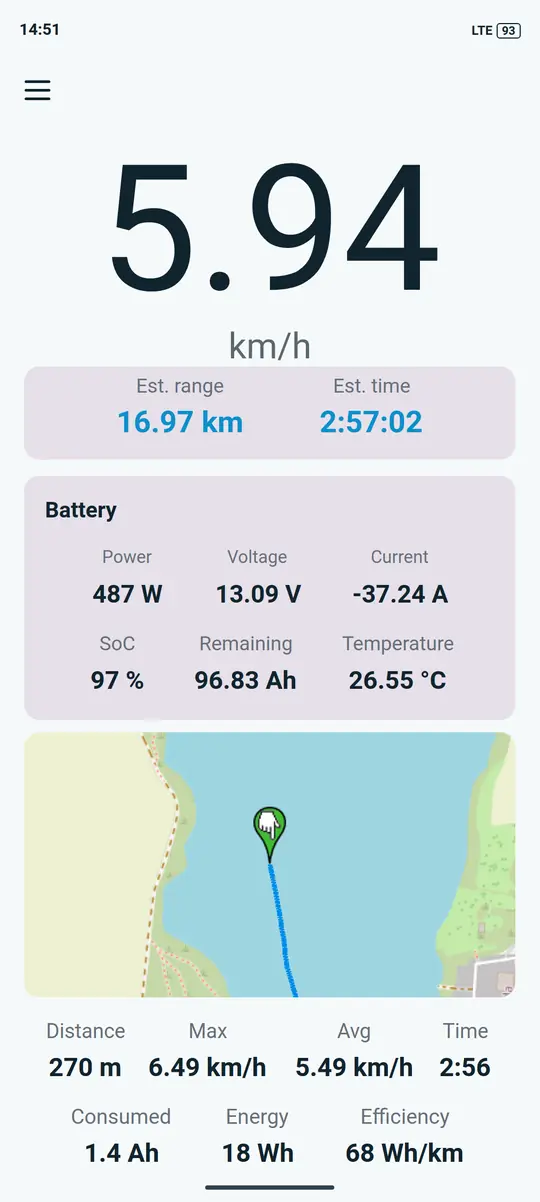
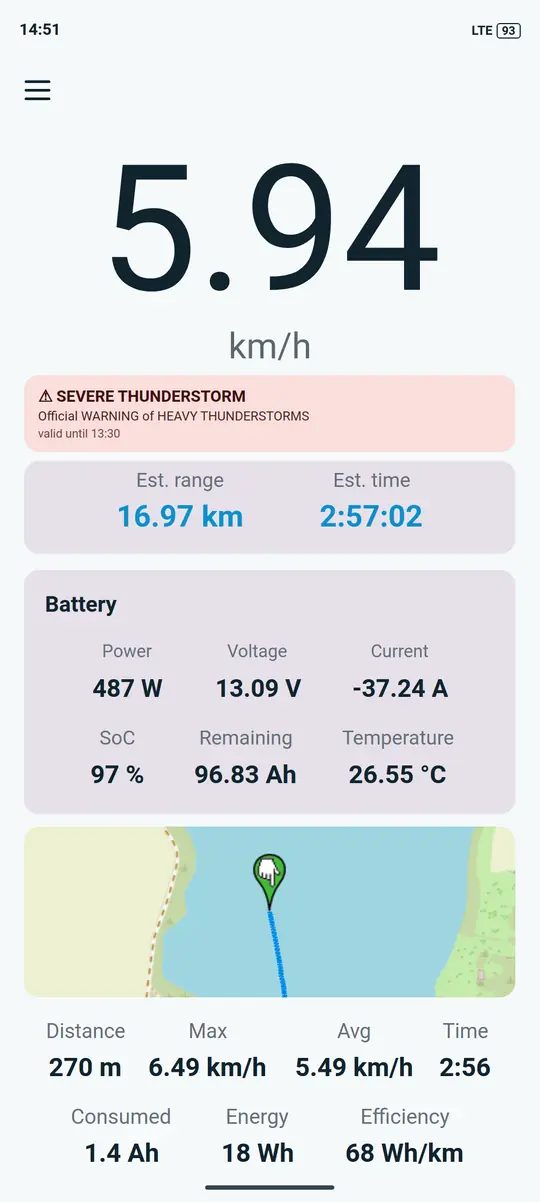
Under motor, paddle or oars. BoatSpeedy shows your speed in big digits, plans routes along waterways and knows locks, weirs and bridge clearances from OpenStreetMap. With a Bluetooth BMS on the battery, it tells you how far the charge will take you at the current speed.
What it does
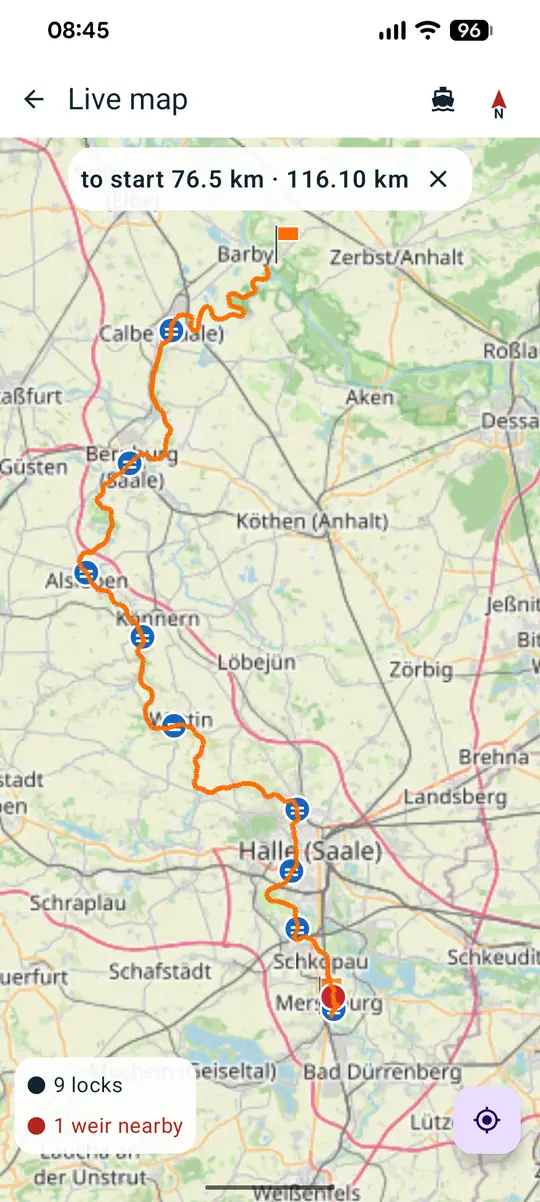
- Routes on the water. Long-press the map to set a destination. The app calculates the route along the waterways on the phone, up to 600 km, with distance and estimated consumption.
- Around the weir. In a canoe the route follows portage paths from OpenStreetMap or goes from landing to landing. It never leads through hydro plants.
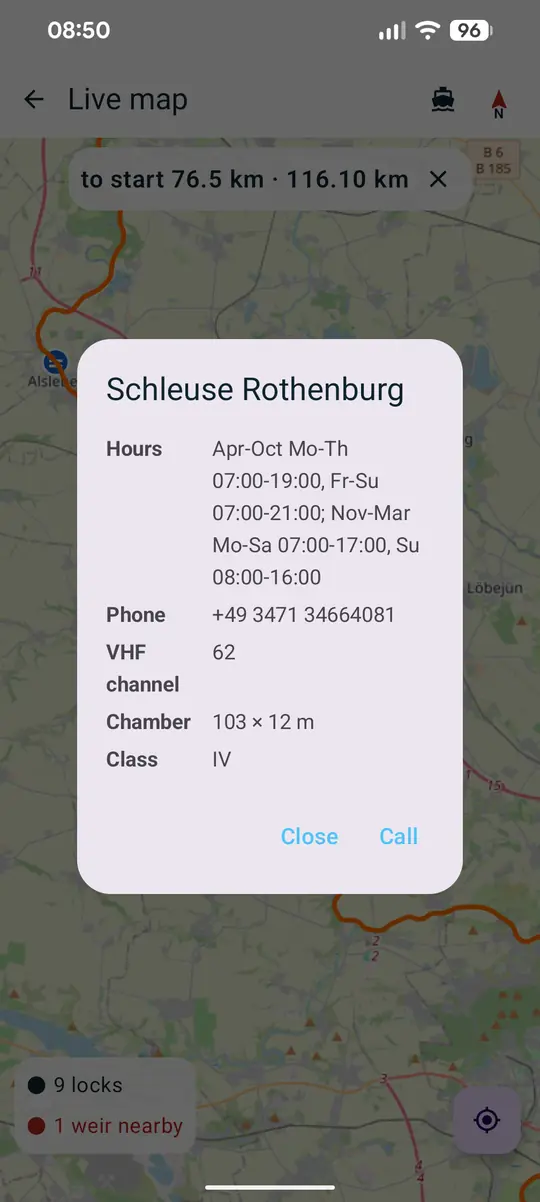
- Locks and bridges. Opening hours, phone, VHF channel and chamber size, plus bridge clearances and seamarks, as recorded in OpenStreetMap.
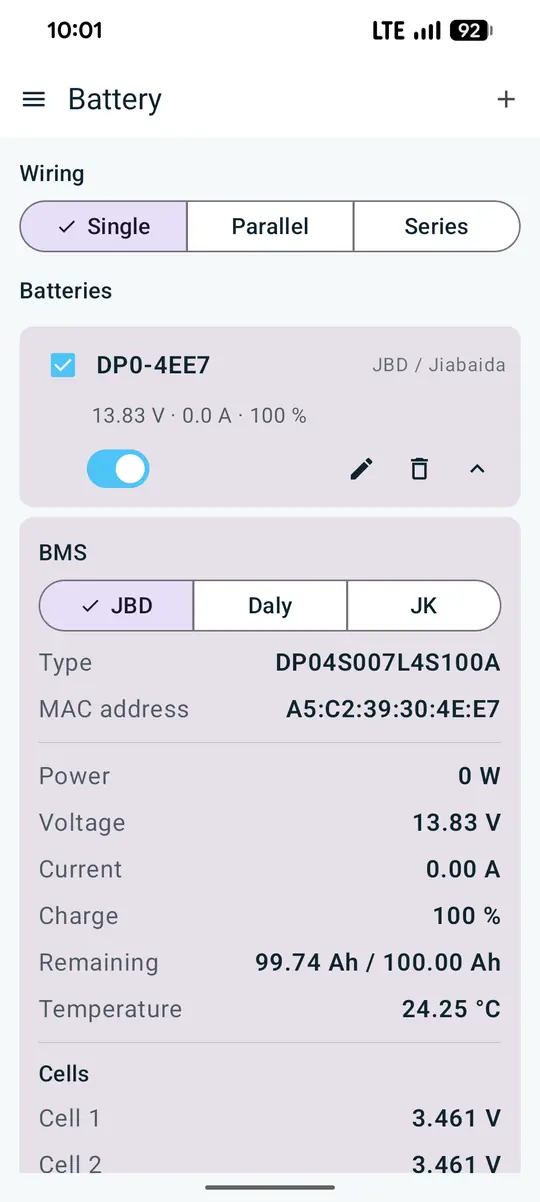
- Battery and range. Voltage, current, state of charge and time left from JBD, Redodo, LiTime and Power Queen, Daly and JK experimental. Batteries without Bluetooth work via a coulometer.
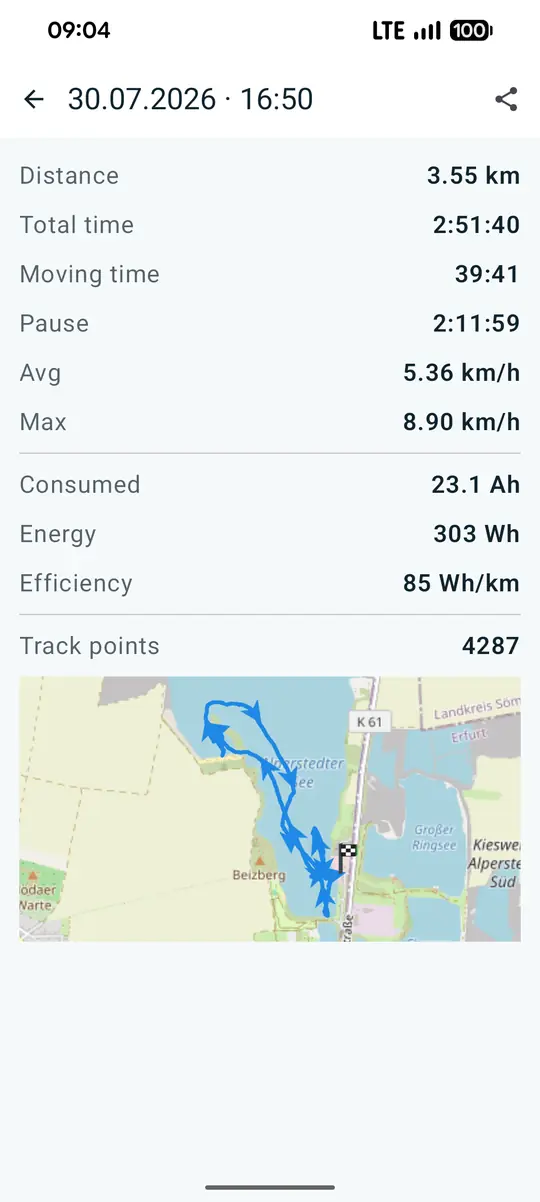
- Trip log. Distance, time underway, amp hours and Wh/km per trip. Tap the track to see speed and consumption at any point. GPX import and export.
- Weather from DWD. Animated rain radar up to 100 minutes ahead, wind as an arrow and warnings for thunderstorms and gales. Plus an anchor watch.
Installation
- Install the app from F-Droid or download the APK from GitHub releases.
- Allow location access and pick your vessel in the settings: motorboat or canoe.
- Before the first route, download the map tiles for your area. A 150 km radius is about 3.4 MB.
- Optionally connect the battery: turn on Bluetooth, choose the BMS under Battery and scan.
Files of version 1.5.2
| File | Size | SHA-256 |
|---|---|---|
| BoatSpeedy-v1.5.2-release.apk | 4 MB | 884f1f6820f27859c9585f41ed6b5f1510a3f608e278068878a7995ad2f81d4f |
Check on Linux with sha256sum filename, on Windows with certutil -hashfile filename SHA256. The files are served by GitHub.
How it's built
The app is written in Kotlin with Jetpack Compose and runs on Android 13 and later. The base map comes from OpenStreetMap, the waterways for routing from a dedicated tile server (see Map data). Weather and warnings come from the German Weather Service. The battery link speaks the BMS Bluetooth protocols directly. F-Droid rebuilds the app from source and checks that the result matches the GitHub release bit for bit.
Changelog
v1.5.225 Oct 2026
New
- wozise.de on the About page: at the bottom next to the copyright, tap to open the site.
Fixed
- Rain radar reworked. The weather map opens at about 150 km instead of street zoom and shows Germany without a GPS fix, before it stayed empty. Each loop belongs to one DWD forecast run and reaches +2 h, rain no longer jumps. A new run loads in the background and only then replaces the old one. Loads faster, with a progress bar. Rain is slightly transparent with round outlines, strong cells keep their level.
- Canoe: closed river stretches are portaged. A stretch tagged
canoe=nooraccess=nocounts like a weir. With a landing before and after it, the route carries from one to the other, even without a mapped portage path. Before, it ended there as a straight line, for example at the old Zeiss weir in Saalfeld. A bareboat=nodoes not count.
v1.5.113 Oct 2026
Changed
- Mill and side channels are closed to routing for canoe and motorboat: waterways named "Lache" or ending in it, such as "Mühllache", often mapped as a canal without any tags. Only an explicit
boat=yesorcanoe=yes(motorboat=yesfor a motorboat) opens them. English mill channels ("leat", "mill race") alike.
v1.5.030 Sep 2026
New
- Save, share and follow routes. The bookmark on the route display saves the route, optionally with a name. Trips, tab Routes, with map, length, locks and craft. Navigate leads to the start with a dashed line and then along the course, for recorded trips and round trips too.
- Names for trips and routes, large with the date below. GPX carries them.
- Arrange the dashboard: hold a tile still for three seconds, then move it, hide it or resize the map. Trip and GPS are tiles of their own.
- Current and power in the track while a battery is connected.
- Motorboat or canoe as position marker, Navigation in the main menu, map server selectable.
Changed
- The app stays in portrait
- Route calculation about twice as fast
- By canoe, mapped portage paths come first, power plant canals are a last resort
- Each weir counts once if you pass through it or portage around it
Fixed
- Routes through lakes broke off (Müritz), the course through the lake was missing from the map data
- Egress points tagged canoe=egress were missing
- Without a fix an old speed often stuck on the speedometer
- The track stopped after 10,000 points, and every position was recorded twice
- Energy and efficiency were missing after GPX export and import
- Symbols lay underneath route and track
v1.4.321 Sep 2026
New
- Portage. In a canoe the route goes around the weir: along the portage paths from OpenStreetMap or, where there are none, from landing to landing. Green dashed, with the distance in the box.
- Put-ins, egress points and slipways from zoom 13, tappable.
- Hydro power plants get their own symbol. The route no longer runs through the turbines.
Changed
- A weir no longer blocks the route, it costs. With no way around, the route goes through and says so
- Only weirs the route actually crosses are counted
- In canoe mode a canal costs more than a river, so mill races lose against the river loop
Fixed
- Weirs mapped as a way across the river were missing entirely, nearly half of them in Germany
- Routes starting above a weir failed
- Portage was often skipped although put-in and egress are mapped
versionCode 47. Refresh the map tiles so weirs and landings arrive.
v1.4.219 Sep 2026
New
- Locks, weirs and bridge clearances on the map from zoom 11, even without a route
- Bridges with a clearance height get their own tappable symbol above the route
- Flow direction on rivers from zoom 14, plus upstream and downstream of the route
- **Chambers tagged only
seamark:type=lock_basin** are included
Fixed
- The lock symbol sat on a gate instead of the middle of the chamber
- Double locks: each chamber has its own symbol with its size
versionCode 45. Refresh the map tiles.
v1.4.116 Sep 2026
New
Offer development builds (developer settings). The update check then also considers the rolling dev build. Off by default.
Changed
- Speed signs come from the downloaded tiles instead of Overpass. The values were already there; the map needs no connection for them.
- The location gate stands only in front of the speedometer. Trips, GPX import and the battery need no GPS and are reachable without it.
- Notifications are asked for when a trip starts, not when the app starts.
- Lock hours are listed one rule per line.
Fixed
- Lock gates caught the tap and showed "gate" instead of the lock details
- Hours under
service_timeswere ignored; three of four locks on the lower Unstrut had none - The update check said "up to date" on a development build
- "Approximate" location led back to the same gate without a word
- Compass directions and two screen-reader labels were hard-coded in German
versionCode 43. Refresh the map tiles so the lock hours arrive.
v1.4.011 Sep 2026
New
Navigation. Set a destination on the map: straight line or a route along the waterways, with distance and estimated draw. Load map data onto the device, then route offline up to 600 km. Craft type, motorboat or canoe, decides which bans apply; blocked stretches are drawn in red.
Locks and weirs on the route. Tap a lock for hours, phone, VHF channel and chamber size. Seamarks are tappable, speed signs show their number.
Map north up or course up, switched from the title bar. Marker and map glide instead of jumping from fix to fix.
Weather screen with rain radar, readings from the nearest DWD station and wind direction.
Coulometer with a Hall sensor for packs without Bluetooth of their own.
Fixed
- Routing broke at tile edges where a river left the rectangle between start and destination (Main at Frankfurt, Saale at Merseburg)
boat=noblocked canoes too, though it is aimed at engines- The map turned in steps and the arrow pointed the wrong way while it did
- Outdated tiles were never offered
- "No continuous waterway" never said why
versionCode 41. Installs over 1.3.4 and over DEV builds.
FAQ
- Do I need a Bluetooth battery?
- No. Without a battery only the battery tile is missing. Speed, map, routes, trips and weather need nothing but the phone.
- Does navigation work offline?
- Routing does, once the tiles are downloaded: the phone does the maths. The OpenStreetMap background map needs a connection.
- Which waters are covered?
- All rivers, canals and fairways in OpenStreetMap for 48 regions in Europe. Streams are left out on purpose.
- Does it cost anything?
- No. No ads, no account, no analytics. Trips stay on the device.