

Overview
FullScreendy shows an FHEM dashboard in full screen and turns the tablet itself into an FHEM device. Over MQTT it reports battery and motion, and FHEM can make it speak, play sounds, switch the screen or change the dashboard.
What it does
- Battery and charging. Level, charging state and temperature arrive as readings in FHEM.
- Motion via camera. Detects motion in front of the tablet and wakes the display. No image leaves the device.
- Speech and sounds. FHEM sends text, the tablet speaks it. Stored sound files play in the background.
- Screen control. Display on and off, brightness, switch dashboard or URL, reload, clear cache. All via MQTT.
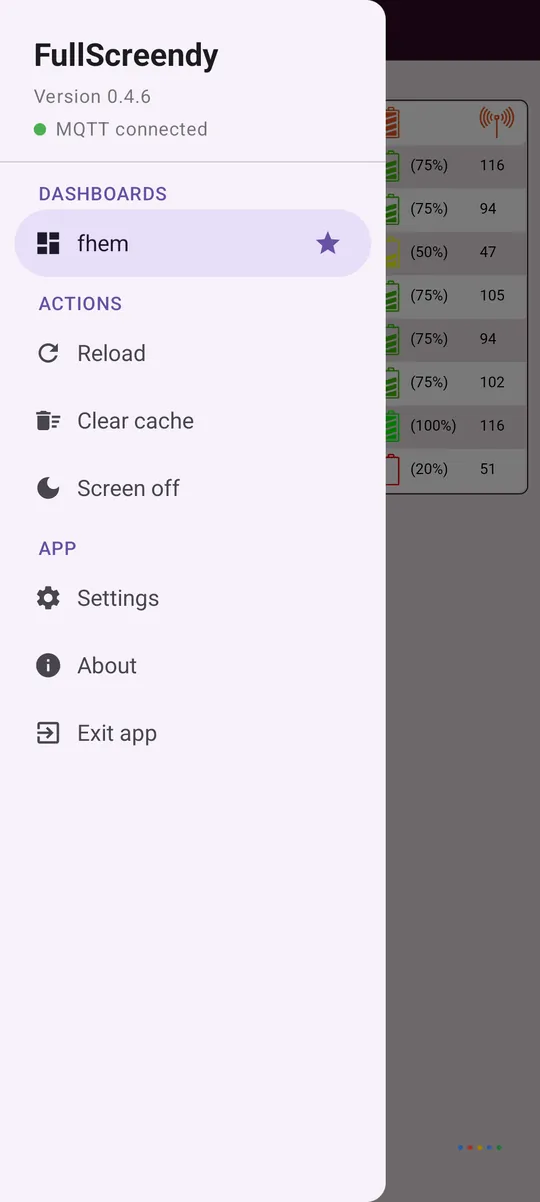
- Up to three dashboards. Named tabs in the menu. The default dashboard returns whenever the screen wakes.
- Always on. A foreground service keeps the broker connection and reconnects by itself. An optional PIN protects the settings.
Installation
- Install the app from F-Droid or download the APK from GitHub releases to the tablet.
- Start the app. Without a URL, the settings open straight away.
- Enter the dashboard URL, MQTT broker and device ID. The tablet then shows up as a device in FHEM.
Files of version 0.4.12
| File | Size | SHA-256 |
|---|---|---|
| FullScreendy-0.4.12-release.apk | 4 MB | 2cf860567c91353ab2c20629eb9b970d60c08feb5845eed79cb50bdf38831291 |
Check on Linux with sha256sum filename, on Windows with certutil -hashfile filename SHA256. The files are served by GitHub.
How it's built
Kotlin, a Chromium-based Android WebView and an MQTT client in a foreground service. Runs on Android 9 and later, so Fire HD tablets with Fire OS 7 work too. The APK is built reproducibly: F-Droid rebuilds the app from source and checks that the result matches the GitHub release bit for bit. The app doesn't install updates itself, it only checks for a new version and links to it.
Changelog
v0.4.1219 Oct 2026
More work from the F-Droid review, thanks to @linsui, @mezinster, @sookoothaii1 and @gitubpatrice.
The WebView no longer asks Google
Android turns on Safe Browsing in every WebView by default: the address being opened is sent to Google's Safe Browsing service. For a wall tablet showing a dashboard on your own network that brings nothing and gives away internal addresses. It is now off, via android.webkit.WebView.EnableSafeBrowsing in the manifest and additionally via safeBrowsingEnabled = false on the WebView itself. On top of that, android.webkit.WebView.MetricsOptOut drops the WebView usage statistics too.
Measured on a fresh Android 15: before setup the app has not a single connection open, afterwards exactly one, to the dashboard host.
Small change
- Store description: the line „All files access“ had been wrong since the SAF switch in 0.4.10 and now describes the folder picker.
Three consecutive clean builds produce byte-identical APKs (SHA-256 2cf860567c91353ab2c20629eb9b970d60c08feb5845eed79cb50bdf38831291).
Signed (CN=FullScreendy), installs as an update over v0.4.x.
v0.4.115 Oct 2026
More work from the F-Droid review, thanks to @linsui, @mezinster and @gitubpatrice.
Update check is off by default
The About page only contacts api.github.com when you tap „Check for updates“. If you want it automatic, switch on „Check for updates automatically“ under Settings → System. Out of the box the app therefore talks only to the dashboard and the MQTT broker you set up.
Fewer permissions at start
On first start the app only asks for the notification permission the foreground service needs. Camera and microphone belong to optional features (motion detection, wake on sound, voice control) and are requested where you switch those on: in the settings.
Small changes
- Removed
requestLegacyExternalStoragefrom the manifest, it has had no effect since the SAF switch in 0.4.10. - The README section on updates still described the in-app download removed in 0.4.9.
Two consecutive clean builds still produce byte-identical APKs.
Signed (CN=FullScreendy), installs as an update over v0.4.x.
v0.4.1023 Sep 2026
Changes from the F-Droid review, thanks to @linsui and @gitubpatrice for the thorough check.
No storage permission any more
The folder with the sound files is now granted under Settings → Sounds through the Android folder picker (Storage Access Framework). The app gets exactly this one folder and nothing else: MANAGE_EXTERNAL_STORAGE and READ_EXTERNAL_STORAGE are gone completely, the APK no longer contains any storage permission.
- Playback as before:
cmd/mediaplay ding.mp3, subfolders with/ - Without a selection the app uses its own folder (
Android/data/de.kewl.fullscreendy/files/sounds) - If you use sounds, pick the folder once again after the update
Note at the dashboard URL
The current URL is published as a retained MQTT reading. The input field now says that credentials belong in the login fields and not in the URL, where they would otherwise reach the broker in plain text.
Two consecutive clean builds still produce byte-identical APKs.
Signed (CN=FullScreendy), installs as an update over v0.4.x.
v0.4.920 Aug 2026
One build for every channel. The app no longer downloads and installs APKs itself: the About page still checks for new versions and links to the release page, installing happens through the browser or, later on, through F-Droid.
This drops the „Install unknown apps“ permission (REQUEST_INSTALL_PACKAGES) completely, and instead of two variants there is exactly one APK again: the same one F-Droid rebuilds and verifies against this release.
Two consecutive clean builds produce byte-identical APKs. Together with dependenciesInfo, switched off in 0.4.8, this lays the groundwork for reproducible builds.
Nothing changes in what the app does.
Signed (CN=FullScreendy), installs as an update over v0.4.x.
v0.4.820 Aug 2026
A pure build release, the app itself is unchanged from v0.4.7.
By default the Android Gradle Plugin embeds an encrypted metadata block about the dependencies used, signed by Google, into the APK. It looks different on every build and makes reproducible builds impossible, the kind that prove the published app really was built from the source code here. The block is now left out (dependenciesInfo).
Cross-check: two consecutive clean builds produce byte-identical APKs.
Which APK?
- FullScreendy-0.4.8-release.apk: the normal variant with in-app update. This is the one you want.
- FullScreendy-0.4.8-fdroid.apk: the same app without updater and without the permission to install apps. It is here so F-Droid can verify its own build against it.
Both signed (CN=FullScreendy), install as an update over v0.4.x.
v0.4.720 Aug 2026
A small release: PIN protection is off by default. On a wall tablet at home, being asked at every touch gets in the way more than it helps. If you want it, switch it on under System; existing installations keep their setting.
The rest prepares for F-Droid:
- New flavor dimension
distribution: github (this APK) with in-app update, fdroid without updater and withoutREQUEST_INSTALL_PACKAGES, where F-Droid handles updates. - Without
keystore.propertiesno signing config is created any more: the build runs through and produces an unsigned APK instead of failing. - The Gradle wrapper is now in the repo, the distribution is pinned via
distributionSha256Sum;vcsInfostays out of the release APK (reproducible builds). - Recipe in
fdroid/and Fastlane metadata including screenshots infastlane/.
Build commands are now assembleGithubRelease and assembleFdroidRelease.
Signed (CN=FullScreendy), installs as an update over v0.4.x.
v0.4.619 Aug 2026
Stable release, bundling everything since v0.4.5.
Several dashboards (up to 3)
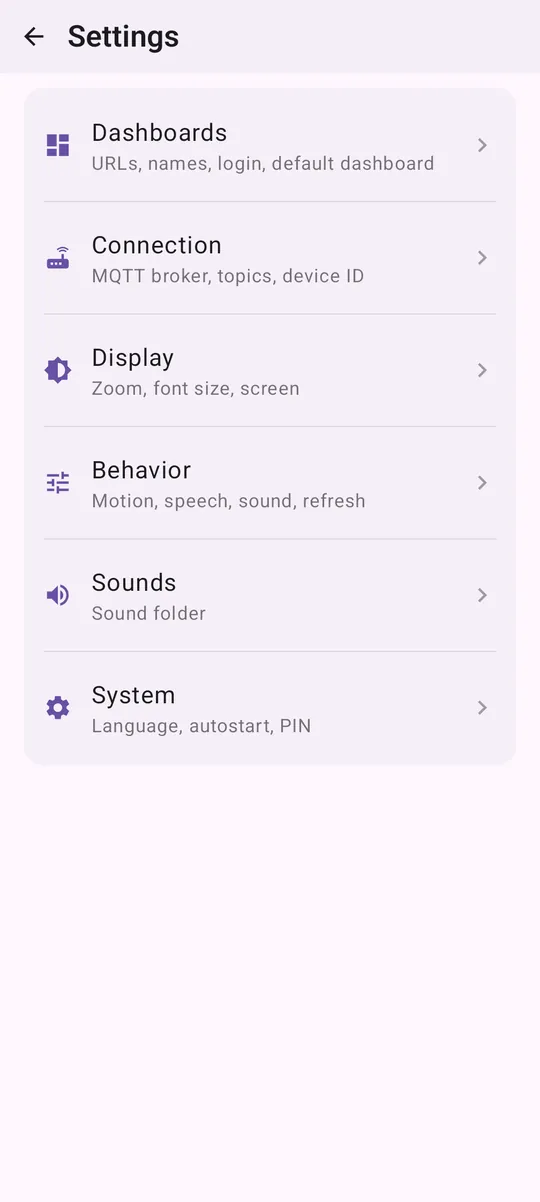
- Settings → Dashboards with tabs Dashboard 1 / 2 / 3 and „+ Add“. Per dashboard: display name, URL, its own login (HTTP Basic Auth) and its own certificate setting, so different servers can be mixed.
- One dashboard is the default dashboard (star): it is shown at start and again after every wake-up of the screen.
- The side menu lists the dashboards for switching.
- MQTT: new command
cmd/dashboard(1to3or a name, aliasdb) and the readingsdashboardanddashboardName. - Existing settings from 0.4.5 are migrated to Dashboard 1 automatically.
Fixed: pull-to-refresh triggered while scrolling up
Scrolling up reloaded the page as soon as the top was reached. Now the decision is made once when the finger touches down: scrolling up stops at the top, and only a newly started pull from top to bottom reloads, with a longer pull distance so it doesn't happen by accident. (Thanks @schwatter for the hint, #1)
Voice control in the dashboard (#1)
Until now the WebView silently refused every getUserMedia() request (NotAllowedError); the Android permission alone is not enough.
- New card Settings → Behavior → Microphone with one choice: Nothing / Wake on sound / Voice control in dashboard. Deliberately one choice instead of two switches: the microphone can only serve one user at a time.
- A missing microphone permission can be requested right there; if the dashboard runs over
http://, you get a warning (without a secure context there is nogetUserMediaat all). - JS bridge: the Android WebView has no
speechSynthesis. Dashboard pages can therefore request speech output directly:
  fullscreendy.textToSpeech("Der Keller ist zu kalt");
fullscreendy.stopSpeech();tools/contains a patch for the FHEM wiki script VoiceControl: Web-STT andwebcheck.js, a diagnostic panel for FHEMWEB.
Usability
- PIN protection can be switched off (System): settings without a PIN prompt.
- Settings reordered: Dashboards first, Connection now only holds MQTT/topics.
- More modern menus: cards, icon rows, side menu with MQTT status and groups, title bar with back arrow.
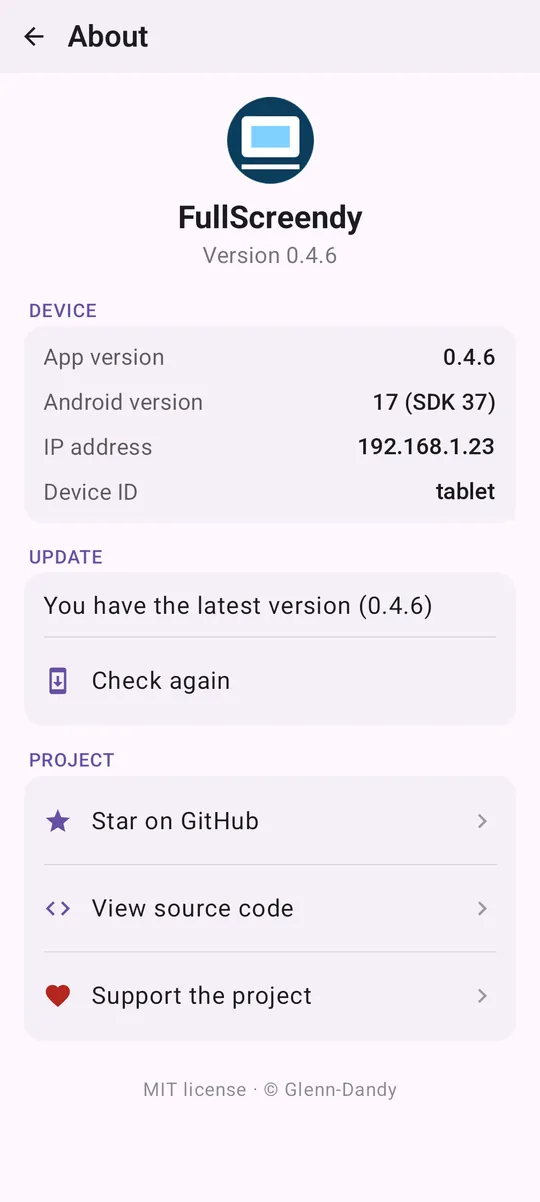
- New About page: app icon, app and Android version, IP and device ID, update download with percentage progress, and links to Star on GitHub, Source code and Support the project.
Signed (CN=FullScreendy), installs as an update over v0.4.x.
v0.4.521 Jul 2026
Stable release, bundling all improvements since v0.4.3.
Long-term operation and diagnostics
- Fixes the
LOW_MEMORYdeath (app there in the morning, „can't be woken“ in the evening):largeHeap, WebView memory is released under pressure, periodic dashboard reload (default 6 h), camera analysis at low resolution. - Automatic UI recovery after a kill (permission „Display over other apps“).
- specialUse foreground service instead of
dataSync(avoids the Android 15 timeout) plus an optional battery optimisation exemption. - Diagnostics: MQTT reading
lastExitand a log with memory trend.
New features
- Android 9 (API 28): now also runs on Android 9 / Fire OS 7 / Fire HD (minSdk 29 → 28).
- Dashboard login: optional user and password fields (HTTP Basic Auth, e.g. FHEM
basicAuth), no moreuser:pass@in the URL. - Allow self-signed HTTPS certificates (for local FHEM HTTPS), off by default.
- In-app update: check, download and install directly from the About page.
Usability and fixes
- Settings save automatically (no more save button).
- Wake-up without the Android swipe code and without a white flash or background image.
- Separate times for dimming and turning the screen off.
- Permission buttons with live status (✓); green MQTT dot removed.
Signed (CN=FullScreendy). From v0.3.2 on the signature differs from earlier debug builds, so uninstall the old version first if needed.
FAQ
- Do I need FHEM?
- Any web page works as a dashboard. The device integration runs over MQTT and is tailored to FHEM.
- Does it run on Amazon Fire HD?
- Yes, from Fire OS 7, which is Android 9.